Context Packing to improve conversational memory
📅 Published on: 28 January 2026
In my last post I explained the problem of context window size: Conversational Memory with messages[] which I solved by limiting the number of messages kept in memory. I mentioned the concept of “Context Packing” (or “Context Compression”) which consists of compressing the content of previous messages to ultimately keep more of them in the same context window.
Let’s see how to modify our previous example to integrate this technique.
Principle of Context Compression
The objective is therefore to implement an automatic compression system for conversational context when the number of tokens exceeds a defined limit, using a second LLM to summarize the history.
- We’re going to merge the message history into a single text string from a certain token limit.
- We send this string to a second LLM specialized in the summarization/compression task.
- We replace the history with the generated summary, which frees up space in the context window.
Regarding the second LLM, we’ll use a lighter and faster model, dedicated to the summarization/compression task: ai/qwen2.5:1.5B-F16
1. Environment variables
Let’s start by modifying the code as follows:
Addition:
// Environment variables
let engineURL = process.env.ENGINE_BASE_URL || 'http://localhost:12434/engines/v1/';
let coderModelId = process.env.CODER_MODEL_ID || 'hf.co/qwen/qwen2.5-coder-3b-instruct-gguf:Q4_K_M';
let compressorModelId = process.env.COMPRESSOR_MODEL_ID || 'ai/qwen2.5:1.5B-F16';
Explanation:
compressorModelId: New LLM model dedicated to context compression- Default model:
ai/qwen2.5:1.5B-F16(lightweight and fast model) - Can be overridden via
COMPRESSOR_MODEL_IDenvironment variable
We can consider increasing the number of messages kept in memory, for example going from 6 to 12 messages. Context packing allows maintaining a longer history without saturating the context window:
// Configuration constants
const MAX_HISTORY_MESSAGES = 12; // Increased thanks to context packing (6 user + 6 model)
const MAX_TOKENS_BEFORE_COMPRESSION = 2000; // Trigger compression when history exceeds this limit
Regarding MAX_TOKENS_BEFORE_COMPRESSION = 2000, I made the following choices:
- Value: 2000 approximate tokens
- Reason: Triggers compression before reaching the default 4096 token limit.
- Safety margin: Leaves ~2000 tokens for response generation and summary
✋ Then it’s up to you to make different adjustments according to your needs and for example by increasing the context window size if your models allow it at launch with Docker Compose for ex:
context_size: 8192.
2. History Merging Function
Let’s add a function to merge the message history into a single formatted text string.
// Function to merge conversation history into a single formatted string
// System instructions are passed separately via the 'system' parameter, not in history
function mergeConversationHistory(messages) {
  let mergedText = '';

  for (const message of messages) {
    // Extract text content
    const messageText = message.content
      .map(content => content.text)
      .join(' ');

    // Add formatted message with original role
    mergedText += `${message.role}: ${messageText}\n\n`;
  }

  return mergedText.trim();
}
✋ Warning, we always keep the first system instruction message.
Now, let’s implement the compression function.
3. Compression Function
The objective is to:
- Create a call function to the compression LLM (
ai/qwen2.5:1.5B-F16). - Handle summary generation.
- Display progress messages.
So, let’s add the following function:
// Function to compress conversation history using the compression model
// Returns a concise summary of the conversation
async function compressContext(conversationHistory, ai) {
  console.log('\n🔄 Starting context compression...');

  // Merge all messages into a single text
  const mergedHistory = mergeConversationHistory(conversationHistory);

  console.log(`📦 Merging ${conversationHistory.length} messages for compression...`);

  // Call compression model
  const { stream, response } = ai.generateStream({
    model: "openai/" + compressorModelId,
    config: {
      temperature: 0.3, // Lower temperature for more focused summarization
    },
    system: `You are a context compression assistant. Your task is to summarize conversations concisely, preserving key facts, decisions, and context needed for continuation.`,
    messages: [{
      role: 'user',
      content: [{
        text: `Summarize the following conversation history concisely, preserving key facts, decisions, and context needed for continuation:\n\n${mergedHistory}`
      }]
    }]
  });

  // Collect the summary
  let summary = '';
  for await (const chunk of stream) {
    summary += chunk.text;
  }

  console.log('✅ Compression completed!');

  return summary;
}
About our Compression Model
I used a lightweight model ai/qwen2.5:1.5B-F16 for fast compression (depending on performance and summary quality you can choose a more powerful model), with temperature: 0.3 so a low temperature for a more faithful and coherent summary.
I used the following system instructions and user message:
System Instructions:
You are a context compression assistant. Your task is to summarize conversations concisely, preserving key facts, decisions, and context needed for continuation.
User Message:
Summarize the following conversation history concisely, preserving key facts, decisions, and context needed for continuation:\n\n${mergedHistory}
✋ These system instructions and the user message clearly have an impact on the quality of the generated summary. I’ll propose more comprehensive ones at the end of this blog post.
4. Compression Statistics Display
I modified the previous compressContext function to calculate and display compression statistics. I want to do the following things:
- Calculate the number of tokens before compression
- Calculate the number of tokens after compression
- Display the gain (tokens saved and percentage)
Here’s the updated code:
async function compressContext(conversationHistory, ai) {
  console.log('\n🔄 Starting context compression...');

  // Calculate tokens before compression
  const tokensBefore = approximateTokenCount(conversationHistory);

  // Merge all messages into a single text
  const mergedHistory = mergeConversationHistory(conversationHistory);

  console.log(`📦 Merging ${conversationHistory.length} messages for compression...`);

  // Call compression model
  const { stream } = ai.generateStream({
    model: "openai/" + compressorModelId,
    config: {
      temperature: 0.3,
    },
    system: `You are a context compression assistant...`,
    messages: [{
      role: 'user',
      content: [{
        text: `Summarize...\n\n${mergedHistory}`
      }]
    }]
  });

  // Collect the summary
  let summary = '';
  for await (const chunk of stream) {
    summary += chunk.text;
  }

  // Calculate tokens after compression
  const tokensAfter = Math.ceil(summary.length / 4);
  const tokensSaved = tokensBefore - tokensAfter;
  const reductionPercentage = Math.round((tokensSaved / tokensBefore) * 100);

  console.log('✅ Compression completed!');
  console.log(`💾 Gain: ${tokensSaved} tokens saved (${reductionPercentage}% reduction)`);
  console.log(`   Before: ~${tokensBefore} tokens → After: ~${tokensAfter} tokens`);

  return {
    summary,
    tokensBefore,
    tokensAfter,
    tokensSaved,
    reductionPercentage
  };
}
Now, we need to integrate these elements into the main conversation handling function.
5. Integration into Main Loop
The following code modification will consist of the following changes:
- Integrate compression into the conversational flow
- Trigger compression automatically at the right time
- Replace history with the summary
- Ensure conversation continuity
// Add model response to history
conversationHistory.push({
  role: 'model',
  content: [{
    text: modelResponse
  }]
});

// Check if compression is needed
const tokenCount = approximateTokenCount(conversationHistory);
console.log(`\n\n📊 Approximate tokens in history: ${tokenCount}`);
console.log(`Messages: ${conversationHistory.length}`);

if (tokenCount > MAX_TOKENS_BEFORE_COMPRESSION) {
  console.log(`⚠️  Token limit exceeded (${tokenCount} > ${MAX_TOKENS_BEFORE_COMPRESSION})`);

  // Compress the conversation history
  const compressionResult = await compressContext(conversationHistory, ai);

  // Replace history with a single summary message
  conversationHistory = [{
    role: 'user',
    content: [{
      text: `[Previous conversation summary]: ${compressionResult.summary}`
    }]
  }];

  console.log(`📝 History replaced with compressed summary`);
  console.log(`New history size: ~${approximateTokenCount(conversationHistory)} tokens`);
}

// Limit history to MAX_HISTORY_MESSAGES as a fallback
if (conversationHistory.length > MAX_HISTORY_MESSAGES) {
  conversationHistory = conversationHistory.slice(-MAX_HISTORY_MESSAGES);
}
- After adding the model’s response to the history, we check the number of tokens.
- Compression is triggered if the threshold is exceeded.
- We replace the history with the generated summary.
- We display the results.
- We keep the message limit as a “safety net”.
Complete Code
Here’s the complete code with all modifications integrated:
import { genkit } from 'genkit';
import { openAICompatible } from '@genkit-ai/compat-oai';
import prompts from "prompts";

// Environment variables
let engineURL = process.env.ENGINE_BASE_URL || 'http://localhost:12434/engines/v1/';
let coderModelId = process.env.CODER_MODEL_ID || 'hf.co/qwen/qwen2.5-coder-3b-instruct-gguf:Q4_K_M';
let compressorModelId = process.env.COMPRESSOR_MODEL_ID || 'ai/qwen2.5:1.5B-F16';

// Function to approximate token count
// Rule of thumb: 1 token ≈ 4 characters in English
function approximateTokenCount(messages) {
  let totalChars = 0;
  for (const message of messages) {
    for (const content of message.content) {
      totalChars += content.text.length;
    }
  }
  return Math.ceil(totalChars / 4);
}

// Function to merge conversation history into a single formatted string
// System instructions are passed separately via the 'system' parameter, not in history
function mergeConversationHistory(messages) {
  let mergedText = '';

  for (const message of messages) {
    // Extract text content
    const messageText = message.content
      .map(content => content.text)
      .join(' ');

    // Add formatted message with original role
    mergedText += `${message.role}: ${messageText}\n\n`;
  }

  return mergedText.trim();
}

// Function to compress conversation history using the compression model
// Returns an object with summary and compression statistics
async function compressContext(conversationHistory, ai) {
  console.log('\n🔄 Starting context compression...');

  // Calculate tokens before compression
  const tokensBefore = approximateTokenCount(conversationHistory);

  // Merge all messages into a single text
  const mergedHistory = mergeConversationHistory(conversationHistory);

  console.log(`📦 Merging ${conversationHistory.length} messages for compression...`);

  // Call compression model
  const { stream } = ai.generateStream({
    model: "openai/" + compressorModelId,
    config: {
      temperature: 0.3, // Lower temperature for more focused summarization
    },
    system: `You are a context compression assistant. Your task is to summarize conversations concisely, preserving key facts, decisions, and context needed for continuation.`,
    messages: [{
      role: 'user',
      content: [{
        text: `Summarize the following conversation history concisely, preserving key facts, decisions, and context needed for continuation:\n\n${mergedHistory}`
      }]
    }]
  });

  // Collect the summary
  let summary = '';
  for await (const chunk of stream) {
    summary += chunk.text;
  }

  // Calculate tokens after compression
  const tokensAfter = Math.ceil(summary.length / 4);
  const tokensSaved = tokensBefore - tokensAfter;
  const reductionPercentage = Math.round((tokensSaved / tokensBefore) * 100);

  console.log('✅ Compression completed!');
  console.log(`💾 Gain: ${tokensSaved} tokens saved (${reductionPercentage}% reduction)`);
  console.log(`   Before: ~${tokensBefore} tokens → After: ~${tokensAfter} tokens`);

  return {
    summary,
    tokensBefore,
    tokensAfter,
    tokensSaved,
    reductionPercentage
  };
}

const ai = genkit({
  plugins: [
    openAICompatible({
      name: 'openai',
      apiKey: '',
      baseURL: engineURL,
    }),
  ],
});

// Conversation history
let conversationHistory = [];

// Configuration constants
const MAX_HISTORY_MESSAGES = 12; // Increased thanks to context packing (6 user + 6 model)
const MAX_TOKENS_BEFORE_COMPRESSION = 2000; // Trigger compression when history exceeds this limit

let exit = false;

while (!exit) {
  const { userQuestion } = await prompts({
    type: "text",
    name: "userQuestion",
    message: "🤖 Your question: ",
    validate: (value) => (value ? true : "😡 Question cannot be empty"),
  });

  if (userQuestion === '/bye') {
    console.log("👋 Goodbye!");
    exit = true;
    break;
  }

  // Add user message to history
  conversationHistory.push({
    role: 'user',
    content: [{
      text: userQuestion
    }]
  });

  const { stream, response } = ai.generateStream({
    model: "openai/"+coderModelId,
    config: {
      temperature: 0.5,
    },
    system: `You are a helpful coding assistant.
    Provide clear and concise answers.
    Use markdown formatting for code snippets.
    `,
    messages: conversationHistory
  });

  let modelResponse = '';
  for await (const chunk of stream) {
    process.stdout.write(chunk.text);
    modelResponse += chunk.text;
  }

  // Add model response to history
  conversationHistory.push({
    role: 'model',
    content: [{
      text: modelResponse
    }]
  });

  // Check if compression is needed
  const tokenCount = approximateTokenCount(conversationHistory);
  console.log(`\n\n📊 Approximate tokens in history: ${tokenCount}`);
  console.log(`Messages: ${conversationHistory.length}`);

  if (tokenCount > MAX_TOKENS_BEFORE_COMPRESSION) {
    console.log(`⚠️  Token limit exceeded (${tokenCount} > ${MAX_TOKENS_BEFORE_COMPRESSION})`);

    // Compress the conversation history
    const compressionResult = await compressContext(conversationHistory, ai);

    // Replace history with a single summary message
    conversationHistory = [{
      role: 'user',
      content: [{
        text: `[Previous conversation summary]: ${compressionResult.summary}`
      }]
    }];

    console.log(`📝 History replaced with compressed summary`);
    console.log(`New history size: ~${approximateTokenCount(conversationHistory)} tokens`);
  }

  // Limit history to MAX_HISTORY_MESSAGES as a fallback
  if (conversationHistory.length > MAX_HISTORY_MESSAGES) {
    conversationHistory = conversationHistory.slice(-MAX_HISTORY_MESSAGES);
  }

}
6. Modifying the compose.yml file
Let’s add the compression model to the compose.yml file and configure the environment variables:
models:
  coder-model:
    model: hf.co/qwen/qwen2.5-coder-3b-instruct-gguf:Q4_K_M
    context_size: 8192
  compressor-model:
    model: ai/qwen2.5:1.5B-F16
    context_size: 4096
Which gives us the complete compose.yml file as follows:
services:
  simple-chat:

    build:
      context: .
      dockerfile: Dockerfile

    stdin_open: true
    tty: true

    models:
      coder-model:
        endpoint_var: ENGINE_BASE_URL
        model_var: CODER_MODEL_ID
      compressor-model:
        endpoint_var: ENGINE_BASE_URL
        model_var: COMPRESSOR_MODEL_ID

models:
  coder-model:
    model: hf.co/qwen/qwen2.5-coder-3b-instruct-gguf:Q4_K_M
    context_size: 8192
  compressor-model:
    model: ai/qwen2.5:1.5B-F16
    context_size: 4096
To launch the project with Docker Compose
Start the services in the background:
docker compose up --build -d
Then launch the application:
docker compose exec simple-chat node index.js
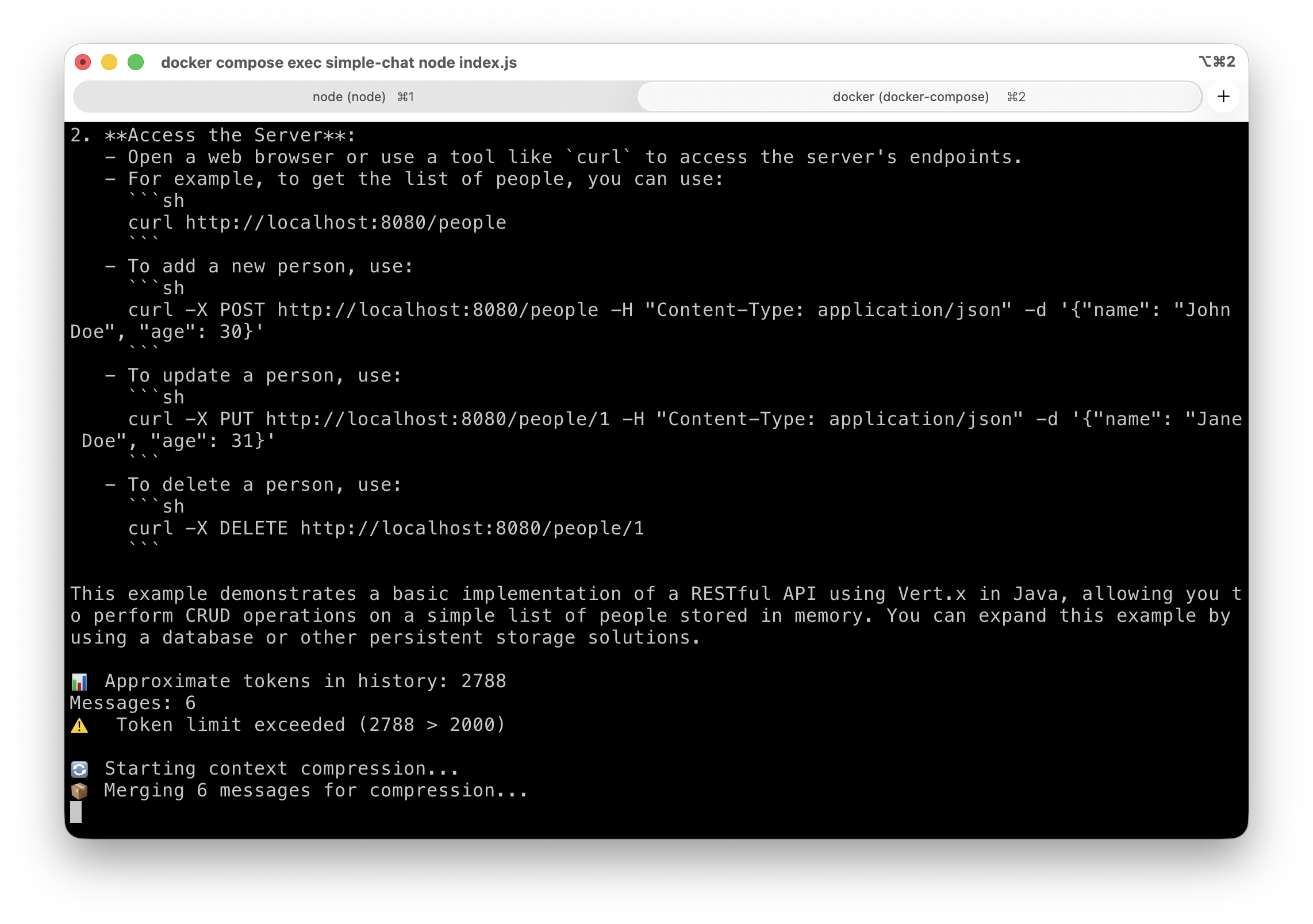
Here’s a context compression trigger:
And the results at the end of compression:
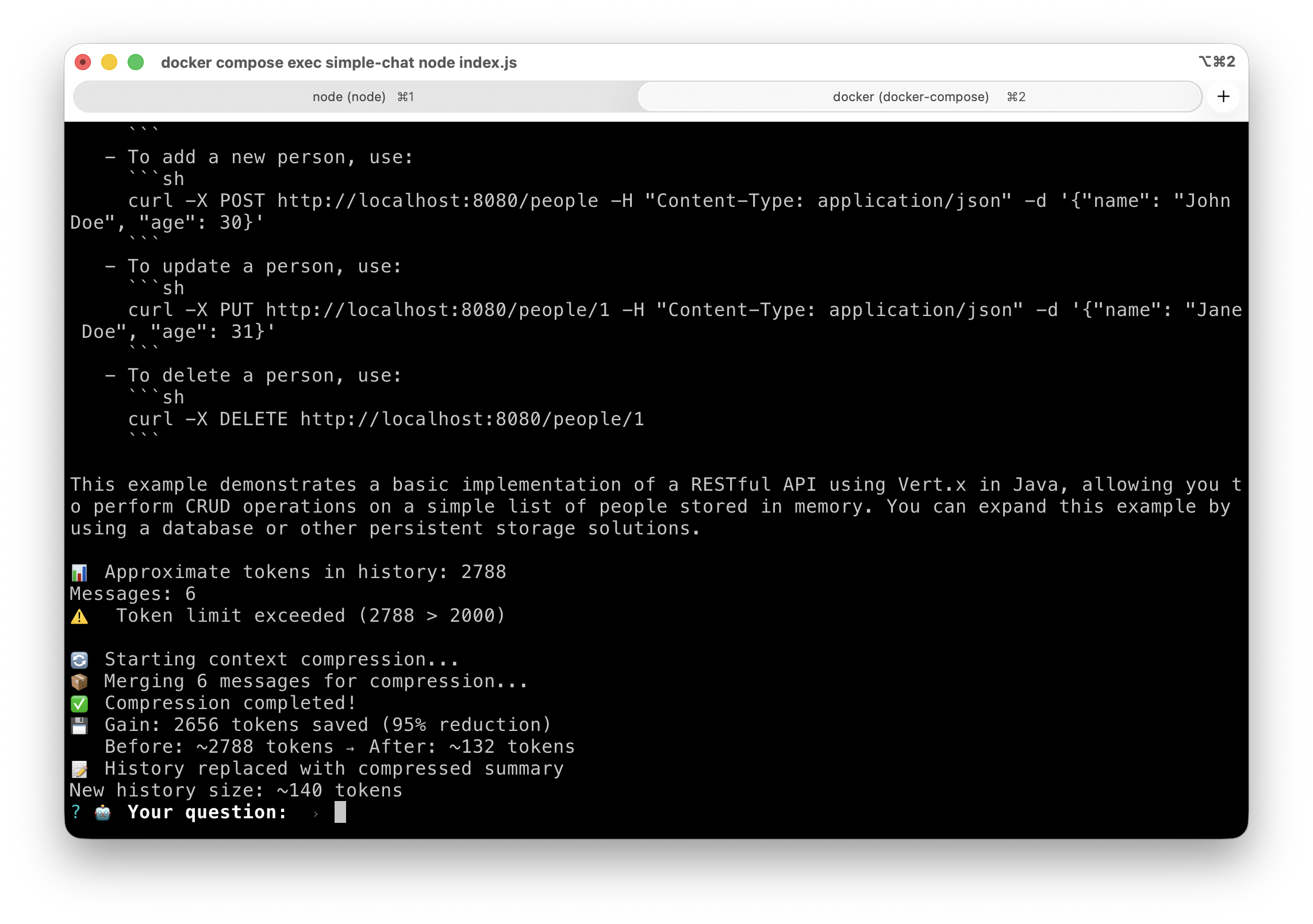
Now, we have an improved conversational memory system thanks to context compression! And we no longer have to worry about the context window limit.
Other System Instructions and User Message Proposals for Compression
You can improve compression by modifying your prompts and also by using models more “skilled” at the summarization/compression task. Here are some examples I use:
“Expert” Version of System Instructions
You are a context compression specialist. Your task is to analyze the conversation history and compress it while preserving all essential information.

## Instructions:
1. **Preserve Critical Information**: Keep all important facts, decisions, code snippets, file paths, function names, and technical details
2. **Remove Redundancy**: Eliminate repetitive discussions, failed attempts, and conversational fluff
3. **Maintain Chronology**: Keep the logical flow and order of important events
4. **Summarize Discussions**: Convert long discussions into concise summaries with key takeaways
5. **Keep Context**: Ensure the compressed version provides enough context for continuing the conversation

## Output Format:
Return a compressed version of the conversation that:
- Uses clear, concise language
- Groups related topics together
- Highlights key decisions and outcomes
- Preserves technical accuracy
- Maintains references to files, functions, and code

## Compression Guidelines:
- Remove: Greetings, acknowledgments, verbose explanations, failed attempts
- Keep: Facts, code, decisions, file paths, function signatures, error messages, requirements
- Summarize: Long discussions into bullet points with essential information
“Effective” Version of System Instructions
You are an expert at summarizing and compressing conversations.
Your role is to create concise summaries that preserve:
- Key information and important facts
- Decisions made
- User preferences
- Emotional context if relevant
- Ongoing or pending actions

Output format:
## Conversation Summary
[Concise summary of exchanges]

## Key Points
- [Point 1]
- [Point 2]

## To Remember
[Important information for continuity]
Other versions for the User Message
Structured
Compress this conversation into a brief summary including:
- Main topics discussed
- Key decisions/conclusions
- Important context for next exchanges
Keep it under 200 words.
Ultra short
Summarize this conversation: extract key facts, decisions, and essential context only.
Continuity
Create a compact summary of this conversation that preserves all information needed to continue the discussion naturally.
That’s the End!
I’ll let you digest all of this while I think about the subject of my next blog post!